SolutionsHR & Recruitment
Keep people operations
moving. Keep decisions
with your team.
Build AI agents that bring together relevant information, prepare briefings, and coordinate next steps across hiring, onboarding, and employee operations. Give your people team support for the administrative work, with clear permissions for communications and actions, and decisions remaining with your team.
Featured workflow: Interview coordination
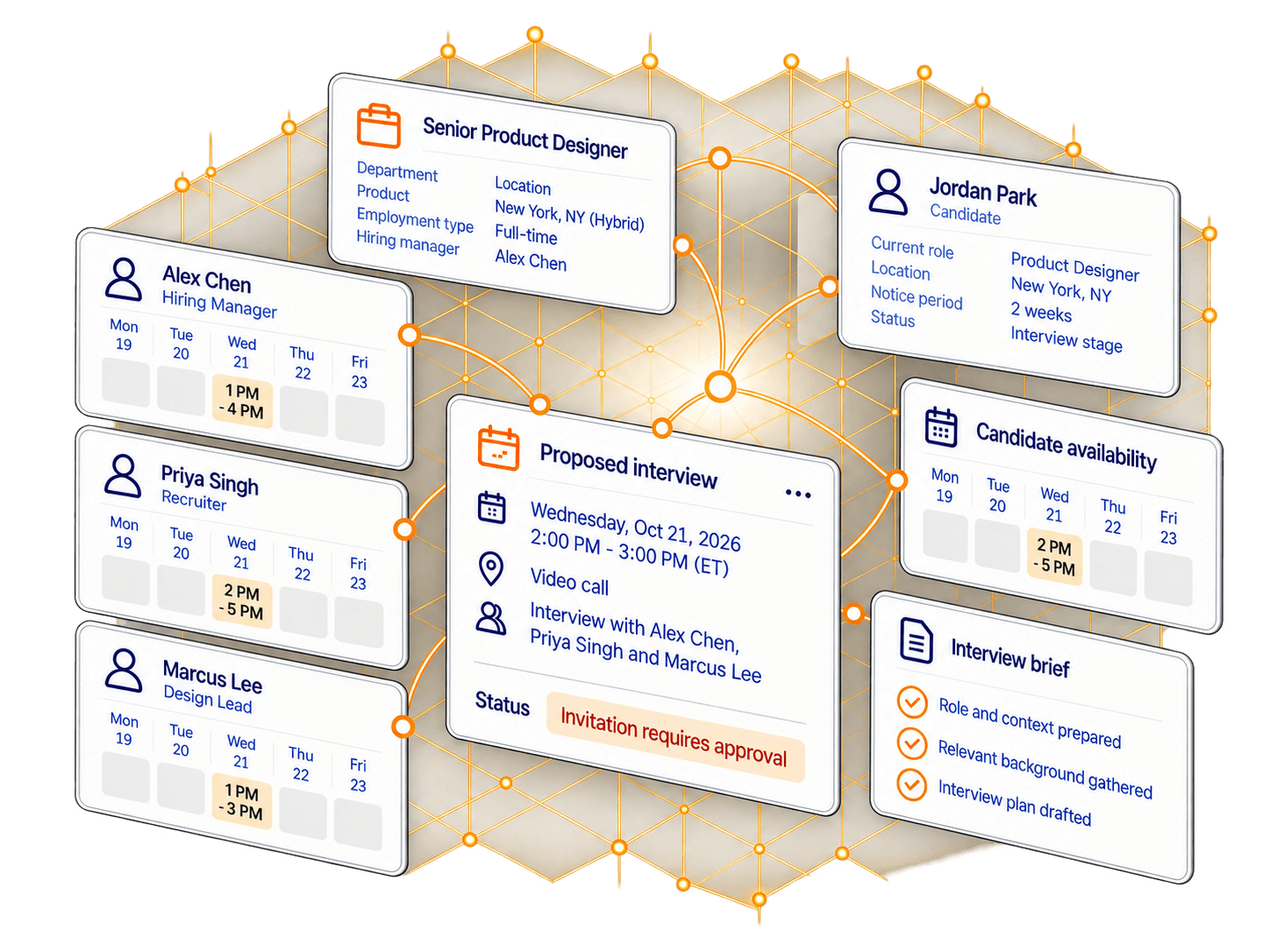
Context ready for review
Relevant records and procedures brought together.
Prepared next steps
Briefings, communication drafts and coordination plans.
Clear action boundaries
Decide what can proceed and what needs approval.
02Workflows to explore
Support the work around your people.
From hiring coordination to employee requests, build agents that gather context, prepare useful work, and coordinate the next step. Keep people decisions and consequential actions within the boundaries your team defines.
- Featured workflow
Interview coordination
Bring together role information and available schedules, prepare the coordination brief, and request permission to send the invitation.
Output: Interview plan and prepared invitation.
See worked example Employee onboarding coordination
Assemble joining information and onboarding tasks, identify missing details, and coordinate follow-ups with the responsible teams.
Output: Onboarding plan with outstanding actions and owners.
Employee request handling
Consult approved policies and relevant permitted records, prepare a response, and route matters requiring a person’s judgment.
Output: Prepared response or case ready for the appropriate team.
Learning and training coordination
Bring together training requirements, session information, and availability, then prepare arrangements and communications.
Output: Training coordination plan and proposed bookings or messages.
Your workflow may be different. Agents are configured around your connected systems, working procedures, and action boundaries.
03One workflow, in detail
Illustrative workflowFeatured workflowInterview coordination
From an interview request to a prepared invitation.
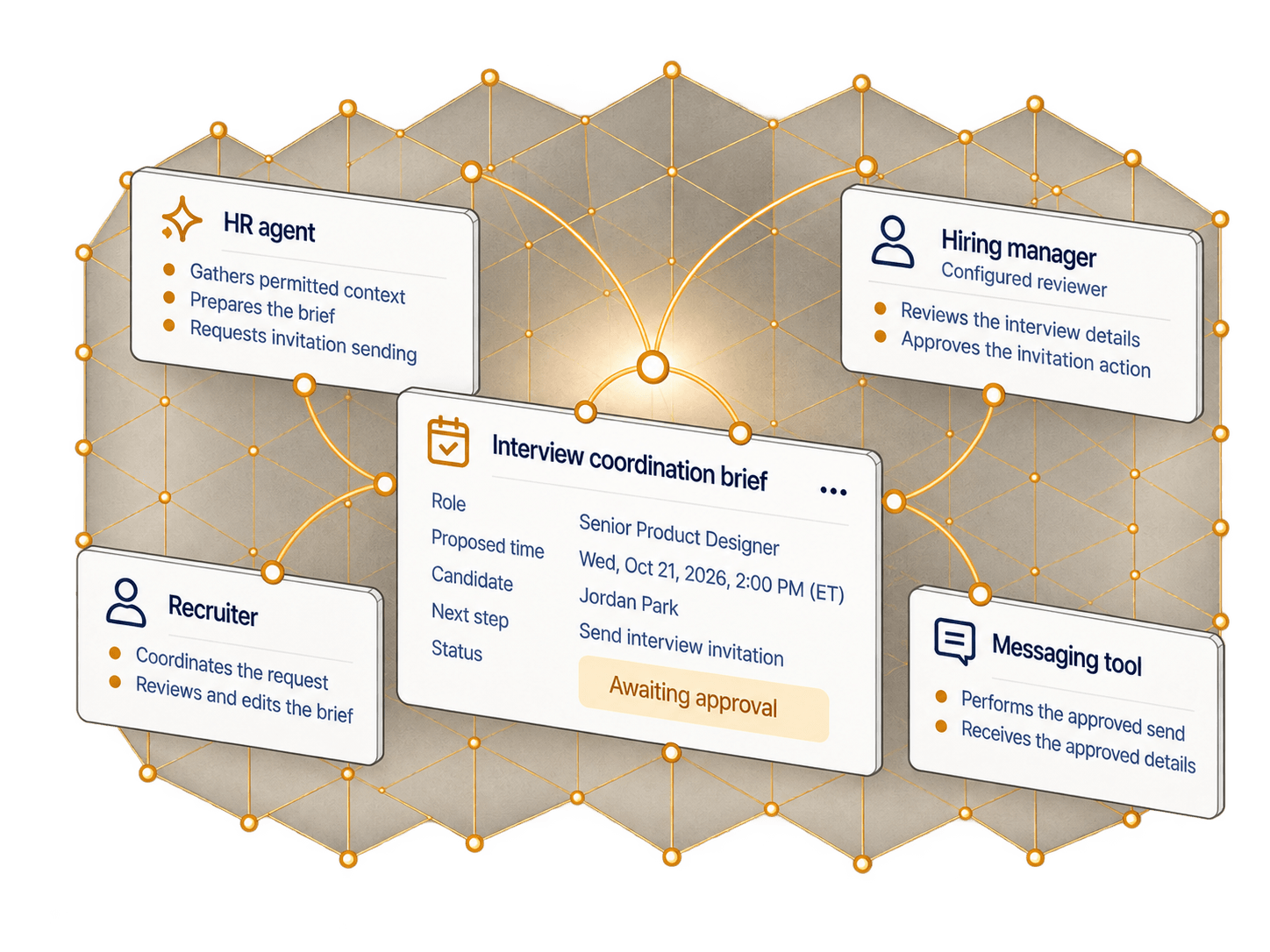
Here is how those capabilities come together in an interview coordination workflow. The agent reviews the role and application context, prepares the coordination brief, requests permission to send the invitation, and records the outcome.
The recruiter has already chosen to arrange an interview.
A static illustration. Each card shows one fictional record at a stage of the workflow; nothing here sends a message, books a time, or reads a live system, and the sent invitation is not an accepted interview.
Review the context
Read the application, role details, and interview availability information.
Interview context
RoleSenior Product DesignerNew York, NY (Hybrid) · Full-timeCandidateJordan ParkApplied Sep 28, 2026AvailabilityWed, Oct 21 (ET)- Candidate2 PM - 5 PM
- Hiring Manager1 PM - 4 PM
- Recruiter2 PM - 5 PM
- Design Lead1 PM - 3 PM
Prepare the brief
Bring the proposed arrangements into an interview coordination brief.
Interview coordination brief
Proposed arrangementsWed, Oct 21, 20262:00 PM - 3:00 PM (ET)Video callParticipants- Alex Chen (Hiring Manager)
- Priya Singh (Recruiter)
- Marcus Lee (Design Lead)
Draft communicationInvitation to the candidate, prepared for review.Still to resolve- Video call link for the calendar invitation
- Interview format notes for the panel
Request permission to send
Present the interview invitation for approval before it is sent.
Send interview invitation
RecipientJordan Parkjordan.park@example.comProposed timeWed, Oct 21, 20262:00 PM - 3:00 PM (ET)Invitation previewHi Jordan,
You’re invited to interview for the Senior Product Designer role. Please find the proposed time and details below.StatusRequires approval
Record the result
Keep the approval decision separate from the sending outcome.
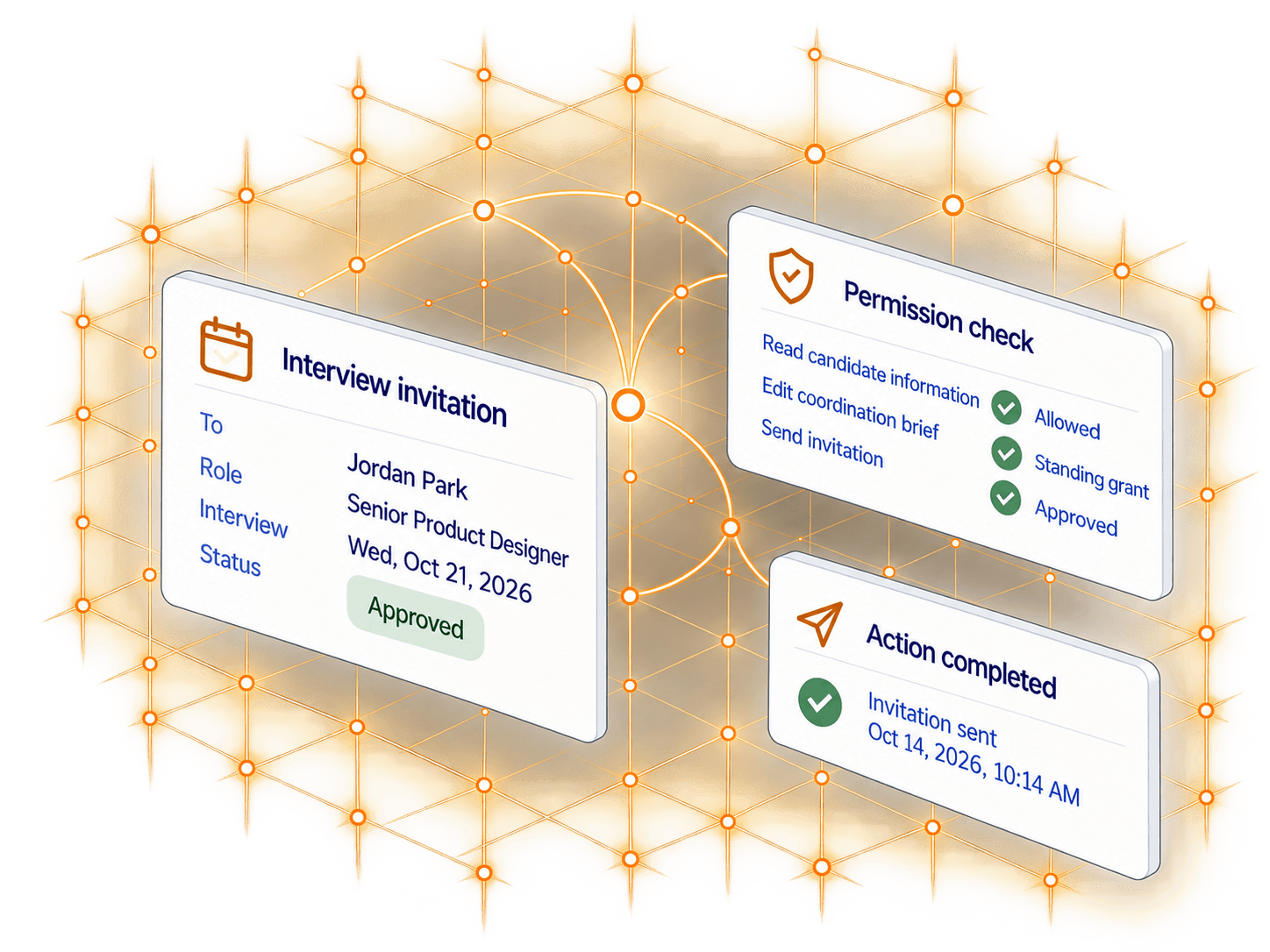
Invitation sent
- Approval grantedOct 14, 2026 at 10:12 AM by Alex Chen
- Invitation sentOct 14, 2026 at 10:14 AM via messaging tool
- Candidate acceptance not recordedA sent invitation is not an accepted interview.
The invitation has been sent. No response from the candidate has been recorded.
04Permissions and approvals
Different workflows.
Explicit boundaries.
For each agent, define the information it can access, the actions it may take, and when a person or connected system must approve. Here is one example from the featured hiring workflow.
Example policies for the featured workflow
| Action | Policy |
|---|---|
| Read application, role, and interview availability information | Allowed |
| Edit the interview coordination brief | Allowed under a standing grant |
| Send an interview invitation | Requires approval |
| Reject an application | Denied |
These are example policies for one workflow. Other people-operations agents can have different boundaries.
Coordination, not candidate selection.
This workflow starts after a recruiter has chosen to arrange an interview. It does not rank applicants, assign suitability scores, or decide who progresses. Rejecting an application is outside this agent’s permitted actions.
05The record and the follow-up
Know what was prepared.
See what was authorized.
Review the agent’s work alongside the permission decisions that governed it. See the brief it prepared, the invitation submitted for approval, and the result of the connected action.
Decision record
An illustrative timeline of actions, permissions, and outcomes.
- Application and role information readAuthorized by: configured read policyOct 14, 202610:03 AM
- Interview availability reviewedAuthorized by: configured read policyOct 14, 202610:07 AM
- Coordination brief preparedAuthorized by: standing grant for artifact editingOct 14, 202610:09 AM
- Interview invitation approvedAuthorized by: configured reviewer approvalOct 14, 202610:12 AM
- Invitation sentRecorded by: messaging tool resultOct 14, 202610:14 AM
- Optional follow-up queuedTriggered by: configured event subscriptionOct 14, 202610:14 AM
Continue the follow-up
without another chat.
Configure a background agent to continue the coordination when a connected event arrives. It can review the available information, prepare the next step, and keep the responsible team informed within its configured permissions.
Interview follow-up
Optional configured follow-up- Review candidate response event
- Prepare next step
- Keep recruiter informed
Triggered by a configured connected event.
06Connected systems and procedures
Build around your
records and
procedures.
Connect the permitted records, scheduling information, and working guidance each people workflow needs. Configure the tools and action boundaries around your systems, whether the task involves hiring, onboarding, employee requests, or training.
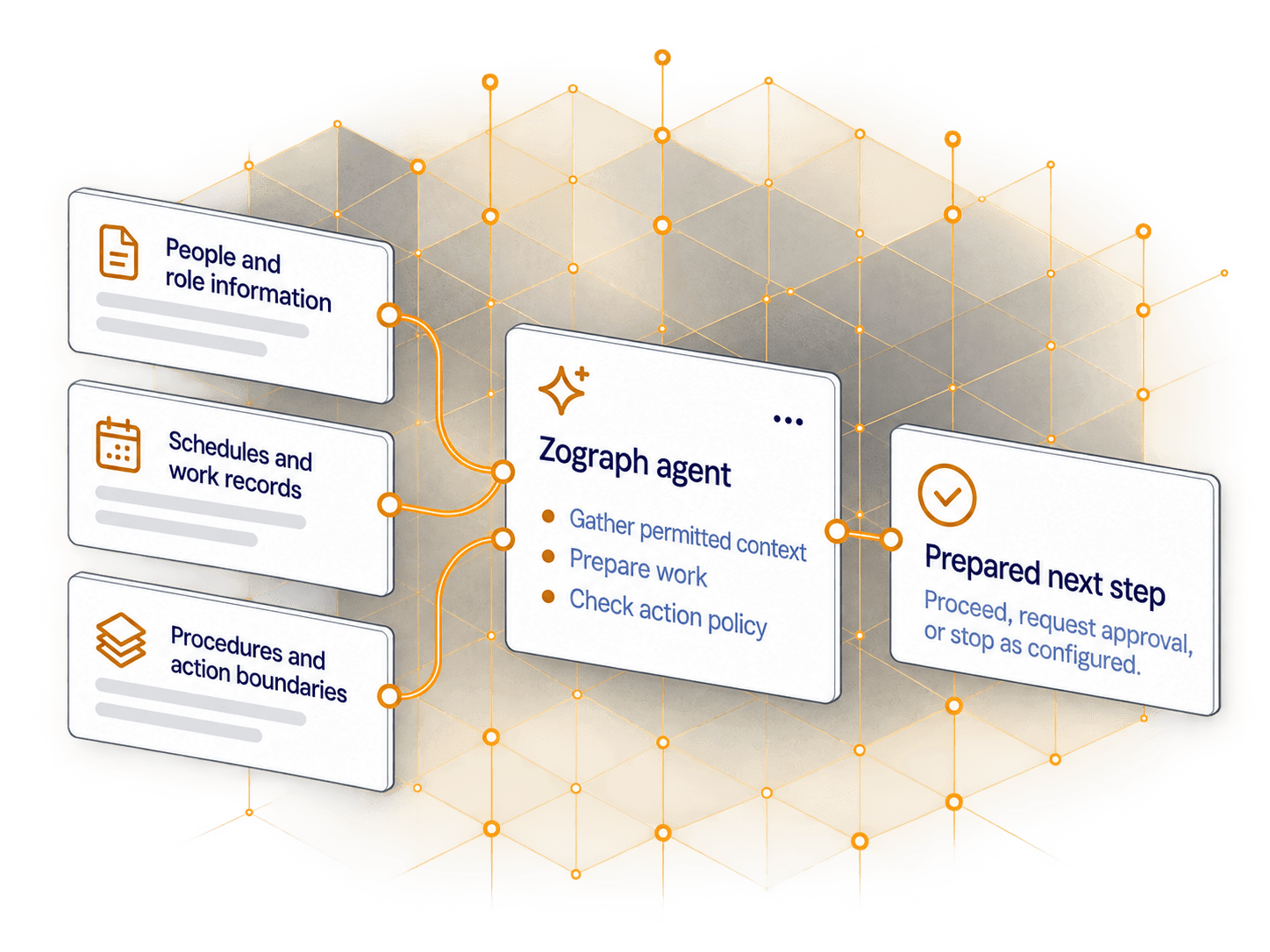
People and role information
Connect the relevant application, role, joining, or employee-request information required for the task, within the access you configure.
Schedules and work records
Bring in the availability, onboarding tasks, training information, or service requests needed to coordinate the next step.
Procedures and action boundaries
Provide approved working guidance and communication procedures. Separately configure what the agent may do and when approval is required.
Available records and actions depend on the integrations and permissions you configure.
07Get started
Start with one
people workflow.
Bring a process your team coordinates today. We’ll explore what an agent should gather, what it should prepare, and where your people need to review or decide.
Clearer people operations.
Better coordination.